Aleo Wallet Adapter
The Aleo Wallet Adapter provides a simple and unified interface for integrating Aleo wallets into your React applications. This guide will walk you through installation, setup, and usage of the wallet adapter.
📲 Installation
Install the required dependencies:
npm install --save \
    @provablehq/aleo-wallet-adaptor-react \
    @provablehq/aleo-wallet-adaptor-react-ui \
    @provablehq/aleo-wallet-adaptor-core \
    @provablehq/aleo-wallet-standard \
    @provablehq/aleo-types \
    react
Additionally, install one or more wallet adapters:
# Shield Wallet
npm install --save @provablehq/aleo-wallet-adaptor-shield

# Leo Wallet
npm install --save @provablehq/aleo-wallet-adaptor-leo

# Puzzle Wallet
npm install --save @provablehq/aleo-wallet-adaptor-puzzle

# Fox Wallet
npm install --save @provablehq/aleo-wallet-adaptor-fox

# Soter Wallet
npm install --save @provablehq/aleo-wallet-adaptor-soter
🛠️ Setup
Wrap your application with the AleoWalletProvider:
import React, { FC } from 'react';
import { AleoWalletProvider } from '@provablehq/aleo-wallet-adaptor-react';
import { LeoWalletAdapter } from '@provablehq/aleo-wallet-adaptor-leo';
import { PuzzleWalletAdapter } from '@provablehq/aleo-wallet-adaptor-puzzle';
import { ShieldWalletAdapter } from '@provablehq/aleo-wallet-adaptor-shield';
import { FoxWalletAdapter } from '@provablehq/aleo-wallet-adaptor-fox';
import { SoterWalletAdapter } from '@provablehq/aleo-wallet-adaptor-soter';
import { Network } from '@provablehq/aleo-types';
import { DecryptPermission } from '@provablehq/aleo-wallet-adaptor-core';
// Import wallet adapter CSS
import '@provablehq/aleo-wallet-adaptor-react-ui/dist/styles.css';

const wallets = [
  new ShieldWalletAdapter(),
  new PuzzleWalletAdapter(),
  new LeoWalletAdapter(),
  new FoxWalletAdapter(),
  new SoterWalletAdapter(),
];

export const App: FC = () => {
  return (
    <AleoWalletProvider
      wallets={wallets}
      network={Network.TESTNET}
      decryptPermission={DecryptPermission.UponRequest}
      autoConnect={true}
      onError={error => console.error(error)}
    >
      {/* Your app components */}
    </AleoWalletProvider>
  );
};
Provider Props
wallets(required): Array of wallet adapter instancesnetwork(optional): The Aleo network to connect to (Network.MAINNET,Network.TESTNET, orNetwork.CANARY). Defaults toNetwork.TESTNETdecryptPermission(optional): Decrypt permission level. Options:DecryptPermission.NoDecrypt- The dapp cannot decrypt any records (default)DecryptPermission.UponRequest- The dapp can decrypt records upon requestDecryptPermission.AutoDecrypt- The dapp can decrypt any requested recordsDecryptPermission.OnChainHistory- The dapp can request on-chain record plain texts and transaction ids and also decrypt any requested records
autoConnect(optional): Whether to automatically connect on mount. Defaults tofalseprograms(optional): Array of program IDs that will be called - Leave empty to allow any program to be called.onError(optional): Error handler callbacklocalStorageKey(optional): Key for storing selected wallet in localStorage. Defaults to'walletName'readAddress(optional, Shield only): Whenfalse, the dapp transacts without ever learning the user's address. Defaults totrue.recordAccess(optional, Shield only): Fine-grained grant controlling which record fields the dapp may read, narrowed by program, record, and field.algorithmsAllowed(optional, Shield only): Opt-in allowlist of wallet-side algorithms that can compute private inputs (e.g. blinding factors) without exposing them to the dapp.
For full details on the privacy props and how to use them, see the Privacy-Preserving Dapps guide.
Using the useWallet Hook
The useWallet hook provides access to wallet state and methods:
import { useWallet } from '@provablehq/aleo-wallet-adaptor-react';
import { Network } from '@provablehq/aleo-types';

function MyComponent() {
  const {
    // State
    wallets,
    wallet,
    address,
    connected,
    connecting,
    disconnecting,
    reconnecting,
    network,

    // Methods
    selectWallet,
    connect,
    disconnect,
    executeTransaction,
    transactionStatus,
    signMessage,
    switchNetwork,
    decrypt,
    requestRecords,
    executeDeployment,
    transitionViewKeys,
    requestTransactionHistory,
  } = useWallet();

  // Your component logic
}
Connecting to a Wallet
Out-of-the-Box Solution
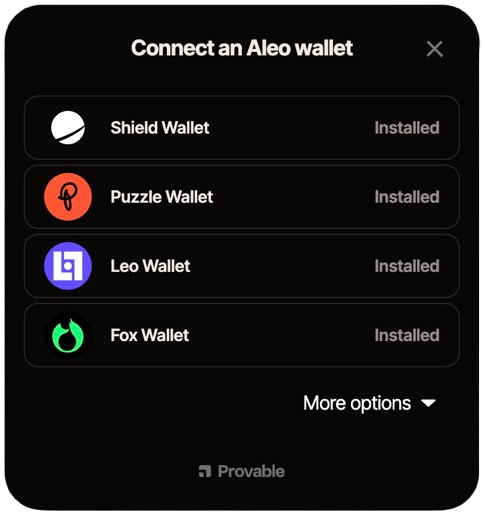
The wallet adapter provides a ready-to-use modal and button component. Simply wrap your app with WalletModalProvider and use the WalletMultiButton component:
import { WalletModalProvider } from '@provablehq/aleo-wallet-adaptor-react-ui';
import { WalletMultiButton } from '@provablehq/aleo-wallet-adaptor-react-ui';

export const App: FC = () => {
  return (
    <AleoWalletProvider wallets={wallets} network={Network.TESTNET}>
      <WalletModalProvider>
        <div>
          <WalletMultiButton />
          {/* Rest of your app */}
        </div>
      </WalletModalProvider>
    </AleoWalletProvider>
  );
};
The WalletMultiButton component automatically:
- Shows "Connect Wallet" when disconnected
- Opens a modal with available wallets when clicked
- Displays the connected wallet address when connected
- Provides a dropdown menu to disconnect or switch wallets
Manual Approach (Custom UI)
If you prefer to build your own wallet connection UI, you can use the useWallet hook directly:
import { useWallet } from '@provablehq/aleo-wallet-adaptor-react';
import { Network } from '@provablehq/aleo-types';
import { WalletNotSelectedError } from '@provablehq/aleo-wallet-adaptor-core';

export const ConnectWallet: FC = () => {
  const { selectWallet, connect, wallet, connected, connecting, wallets } = useWallet();

  const handleConnect = async () => {
    try {
      // First, select a wallet
      if (!wallet) {
        // Select the wallet you want to connect (we will select the first one)
        const firstWallet = wallets[0];
        if (firstWallet) {
          selectWallet(firstWallet.adapter.name);
        } else {
          throw new WalletNotSelectedError();
        }
      }

      // Then connect (only needed if autoConnect is false on AleoWalletProvider)
      await connect(Network.TESTNET);
    } catch (error) {
      console.error('Failed to connect:', error);
    }
  };

  return (
    <button onClick={handleConnect} disabled={connecting || connected}>
      {connecting ? 'Connecting...' : connected ? 'Connected' : 'Connect Wallet'}
    </button>
  );
};
✍🏻 Signing Messages
import { useWallet } from '@provablehq/aleo-wallet-adaptor-react';
import { WalletNotConnectedError } from '@provablehq/aleo-wallet-adaptor-core';
import React, { FC, useCallback } from 'react';

export const SignMessage: FC = () => {
  const { address, signMessage, connected } = useWallet();

  const onClick = useCallback(async () => {
    if (!connected || !address) {
      throw new WalletNotConnectedError();
    }

    const message = 'Hello, Aleo!';
    const signature = await signMessage(message);
    console.log('Signature:', new TextDecoder().decode(signature));
  }, [address, signMessage, connected]);

  return (
    <button onClick={onClick} disabled={!connected}>
      Sign Message
    </button>
  );
};
🔓 Decrypting Records
import { useWallet } from '@provablehq/aleo-wallet-adaptor-react';
import { WalletNotConnectedError } from '@provablehq/aleo-wallet-adaptor-core';
import React, { FC, useCallback } from 'react';

export const DecryptMessage: FC = () => {
  const { address, decrypt, connected } = useWallet();

  const onClick = useCallback(async () => {
    if (!connected || !address) {
      throw new WalletNotConnectedError();
    }

    const cipherText = 'record1qyqsyqcyq5rqwzqfpgqshzv...'; // Your encrypted record
    const decryptedPayload = await decrypt(cipherText);
    console.log('Decrypted:', decryptedPayload);
  }, [address, decrypt, connected]);

  return (
    <button onClick={onClick} disabled={!connected}>
      Decrypt Record
    </button>
  );
};
🗂️ Requesting Records
import { useWallet } from '@provablehq/aleo-wallet-adaptor-react';
import { WalletNotConnectedError } from '@provablehq/aleo-wallet-adaptor-core';
import React, { FC, useCallback } from 'react';

export const RequestRecords: FC = () => {
  const { address, requestRecords, connected } = useWallet();

  const onClick = useCallback(async () => {
    if (!connected || !address) {
      throw new WalletNotConnectedError();
    }

    const program = 'credits.aleo';
    // Request records (encrypted)
    const records = await requestRecords(program);
    console.log('Records:', records);

    // Request all the records with plaintext (requires appropriate decrypt permission)
    const recordsWithPlaintext = await requestRecords(program, true, 'all');
    console.log('All Records with plaintext:', recordsWithPlaintext);

    // Request all the unspent records
    const unspentRecordsWithPlaintext = await requestRecords(program, true, 'unspent');
    console.log('Unspent Records with plaintext:', unspentRecordsWithPlaintext);

    // Request all the spent records
    const spentRecordsWithPlaintext = await requestRecords(program, true, 'spent');
    console.log('Spent Records with plaintext:', spentRecordsWithPlaintext);
  }, [address, requestRecords, connected]);

  return (
    <button onClick={onClick} disabled={!connected}>
      Request Records
    </button>
  );
};
📡 Executing Transactions
import { useWallet } from '@provablehq/aleo-wallet-adaptor-react';
import { WalletNotConnectedError } from '@provablehq/aleo-wallet-adaptor-core';
import { TransactionOptions } from '@provablehq/aleo-types';
import React, { FC, useCallback, useRef, useEffect } from 'react';

export const ExecuteTransaction: FC = () => {
  const { address, executeTransaction, transactionStatus, connected } = useWallet();
  const pollingIntervalRef = useRef<NodeJS.Timeout | null>(null);

  const pollTransactionStatus = useCallback(
    async (tempTransactionId: string) => {
      try {
        const statusResponse = await transactionStatus(tempTransactionId);
        console.log('Transaction Status:', statusResponse.status);

        if (statusResponse.status.toLowerCase() !== 'pending') {
          // Stop polling when status is no longer pending
          if (pollingIntervalRef.current) {
            clearInterval(pollingIntervalRef.current);
            pollingIntervalRef.current = null;
          }

          if (statusResponse.transactionId) {
            // Transaction is now on-chain, we have the final transaction ID
            console.log('On-chain Transaction ID:', statusResponse.transactionId);
          }

          if (statusResponse.status.toLowerCase() === 'accepted') {
            console.log('Transaction accepted!');
          } else if (
            statusResponse.status.toLowerCase() === 'failed' ||
            statusResponse.status.toLowerCase() === 'rejected'
          ) {
            console.error('Transaction failed:', statusResponse.error || statusResponse.status);
          }
        }
      } catch (error) {
        console.error('Error polling transaction status:', error);
        // Stop polling on error
        if (pollingIntervalRef.current) {
          clearInterval(pollingIntervalRef.current);
          pollingIntervalRef.current = null;
        }
      }
    },
    [transactionStatus],
  );

  const onClick = useCallback(async () => {
    if (!connected || !address) {
      throw new WalletNotConnectedError();
    }

    const transactionOptions: TransactionOptions = {
      program: 'credits.aleo',
      function: 'transfer_public',
      inputs: [
        'aleo1...', // Recipient address
        '100u64', // Amount
      ],
      fee: 100000, // Transaction fee in microcredits
      privateFee: false, // Whether the fee is private
    };

    try {
      // Execute the transaction
      const result = await executeTransaction(transactionOptions);

      // NOTE: This is not the on-chain transaction id
      // This is a temporary transaction ID that can be used to check the transaction status.
      console.log('Temporary Transaction ID:', result?.transactionId);

      if (result?.transactionId) {
        // Start polling for transaction status every 1 second
        // Poll until status is no longer "pending"
        pollingIntervalRef.current = setInterval(() => {
          pollTransactionStatus(result.transactionId);
        }, 1000);

        // Initial status check
        await pollTransactionStatus(result.transactionId);
      }
    } catch (error) {
      console.error('Transaction failed:', error);
      // Clean up polling interval on error
      if (pollingIntervalRef.current) {
        clearInterval(pollingIntervalRef.current);
        pollingIntervalRef.current = null;
      }
    }
  }, [address, executeTransaction, pollTransactionStatus, connected]);

  // Cleanup polling interval on unmount
  useEffect(() => {
    return () => {
      if (pollingIntervalRef.current) {
        clearInterval(pollingIntervalRef.current);
      }
    };
  }, []);

  return (
    <button onClick={onClick} disabled={!connected}>
      Execute Transaction
    </button>
  );
};
💻 Deploying Programs
import { useWallet } from '@provablehq/aleo-wallet-adaptor-react';
import { WalletNotConnectedError } from '@provablehq/aleo-wallet-adaptor-core';
import { AleoDeployment } from '@provablehq/aleo-wallet-standard';
import { Network } from '@provablehq/aleo-types';
import React, { FC, useCallback } from 'react';

export const DeployProgram: FC = () => {
  const { address, executeDeployment, connected } = useWallet();

  const onClick = useCallback(async () => {
    if (!connected || !address) {
      throw new WalletNotConnectedError();
    }

    const program = `
      program hello.aleo;
      function main:
        input r0 as u32.public;
        input r1 as u32.private;
        add r0 r1 into r2;
        output r2 as u32.private;
    `;

    const deployment: AleoDeployment = {
      program: program,
      address: address,
      priorityFee: 1000000, // Priority fee in microcredits
      privateFee: false,
    };

    try {
      const result = await executeDeployment(deployment);
      console.log('Deployment Transaction ID:', result.transactionId);
    } catch (error) {
      console.error('Deployment failed:', error);
    }
  }, [address, executeDeployment, connected]);

  return (
    <button onClick={onClick} disabled={!connected}>
      Deploy Program
    </button>
  );
};
🔄 Switching Networks
import { useWallet } from '@provablehq/aleo-wallet-adaptor-react';
import { WalletNotConnectedError } from '@provablehq/aleo-wallet-adaptor-core';
import { Network } from '@provablehq/aleo-types';
import React, { FC, useCallback } from 'react';

export const SwitchNetwork: FC = () => {
  const { address, switchNetwork, connected } = useWallet();

  const handleSwitch = useCallback(
    async (targetNetwork: Network) => {
      if (!connected || !address) {
        throw new WalletNotConnectedError();
      }

      try {
        const success = await switchNetwork(targetNetwork);
        if (success) {
          console.log(`Switched to ${targetNetwork}`);
        }
      } catch (error) {
        console.error('Failed to switch network:', error);
      }
    },
    [address, switchNetwork, connected],
  );

  return (
    <div>
      <button onClick={() => handleSwitch(Network.TESTNET)} disabled={!connected}>
        Switch to Testnet
      </button>
      <button onClick={() => handleSwitch(Network.MAINNET)} disabled={!connected}>
        Switch to Mainnet
      </button>
    </div>
  );
};
📜 Requesting Transaction History
This requires the OnChainHistory decrypt permission:
import { useWallet } from '@provablehq/aleo-wallet-adaptor-react';
import { WalletNotConnectedError } from '@provablehq/aleo-wallet-adaptor-core';
import React, { FC, useCallback } from 'react';

export const RequestTransactionHistory: FC = () => {
  const { address, requestTransactionHistory, connected } = useWallet();

  const onClick = useCallback(async () => {
    if (!connected || !address) {
      throw new WalletNotConnectedError();
    }

    const program = 'credits.aleo';
    const history = await requestTransactionHistory(program);
    console.log('Transaction History:', history);
  }, [address, requestTransactionHistory, connected]);

  return (
    <button onClick={onClick} disabled={!connected}>
      Request Transaction History
    </button>
  );
};
🔑 Getting Transition View Keys
This requires the OnChainHistory decrypt permission:
import { useWallet } from '@provablehq/aleo-wallet-adaptor-react';
import { WalletNotConnectedError } from '@provablehq/aleo-wallet-adaptor-core';
import React, { FC, useCallback } from 'react';

export const GetTransitionViewKeys: FC = () => {
  const { address, transitionViewKeys, connected } = useWallet();

  const onClick = useCallback(async () => {
    if (!connected || !address) {
      throw new WalletNotConnectedError();
    }

    const transactionId = 'at1...'; // Transaction ID
    const viewKeys = await transitionViewKeys(transactionId);
    console.log('Transition View Keys:', viewKeys);
  }, [address, transitionViewKeys, connected]);

  return (
    <button onClick={onClick} disabled={!connected}>
      Get Transition View Keys
    </button>
  );
};
📊 Checking Transaction Status
import { useWallet } from '@provablehq/aleo-wallet-adaptor-react';
import { WalletNotConnectedError } from '@provablehq/aleo-wallet-adaptor-core';
import React, { FC, useCallback } from 'react';

export const CheckTransactionStatus: FC = () => {
  const { address, transactionStatus, connected } = useWallet();

  const onClick = useCallback(async () => {
    if (!connected || !address) {
      throw new WalletNotConnectedError();
    }

    // Some wallets might only accept an internal transactionId,
    // others might accept both onchainId or wallet-specific internal transactionId
    const transactionId = 'at1...';
    const status = await transactionStatus(transactionId);
    console.log('Status:', status.status);
    console.log('On-chain Transaction ID:', status.transactionId);
    if (status.error) {
      console.error('Error:', status.error);
    }
  }, [address, transactionStatus, connected]);

  return (
    <button onClick={onClick} disabled={!connected}>
      Check Transaction Status
    </button>
  );
};
🔒 Privacy-Preserving Dapps
The Shield wallet supports a set of advanced privacy features that let your dapp transact while learning strictly less about the user:
readAddress: false— transact without the dapp ever seeing the user's address.recordAccess— expose only the specific record fields your dapp needs, nothing more.InputRequestslots — let the wallet choose or compute inputs (records, addresses, derived values) without the dapp handling plaintext.algorithmsAllowed— allow the wallet to compute private cryptographic inputs (e.g. blinding factors) that never leave the wallet.
These features are opt-in and additive — existing dapps using literal string inputs continue to work unchanged.
For a full guide including the permission model, InputRequest shapes, derived inputs, and error handling, see the Privacy-Preserving Dapps guide.
🎯 Complete Example
Here's a complete example combining multiple features using the out-of-the-box wallet connection UI:
import React, { FC, useCallback, useState } from 'react';
import { AleoWalletProvider, useWallet } from '@provablehq/aleo-wallet-adaptor-react';
import { WalletModalProvider, WalletMultiButton } from '@provablehq/aleo-wallet-adaptor-react-ui';
import { ShieldWalletAdapter } from '@provablehq/aleo-wallet-adaptor-shield';
import { Network } from '@provablehq/aleo-types';
import { DecryptPermission, WalletNotConnectedError } from '@provablehq/aleo-wallet-adaptor-core';
import { TransactionOptions } from '@provablehq/aleo-types';
// Import wallet adapter CSS
import '@provablehq/aleo-wallet-adaptor-react-ui/dist/styles.css';

const wallets = [new ShieldWalletAdapter()];

function WalletApp() {
  const { address, connected, executeTransaction, transactionStatus } = useWallet();
  const [txId, setTxId] = useState<string | null>(null);

  const handleTransaction = useCallback(async () => {
    if (!connected || !address) {
      throw new WalletNotConnectedError();
    }

    const options: TransactionOptions = {
      program: 'credits.aleo',
      function: 'transfer_public',
      inputs: ['aleo1...', '100u64'],
      fee: 100000,
    };

    try {
      const result = await executeTransaction(options);
      if (result?.transactionId) {
        setTxId(result.transactionId);

        // Poll for status
        const status = await transactionStatus(result.transactionId);
        console.log('Transaction status:', status);
      }
    } catch (error) {
      console.error('Transaction failed:', error);
    }
  }, [connected, address, executeTransaction, transactionStatus]);

  return (
    <div>
      <WalletMultiButton />
      <div style={{ marginTop: '20px' }}>
        <button onClick={handleTransaction} disabled={!connected}>
          Execute Transaction
        </button>
        {txId && <p>Transaction ID: {txId}</p>}
      </div>
    </div>
  );
}

export const App: FC = () => {
  return (
    <AleoWalletProvider
      wallets={wallets}
      network={Network.TESTNET}
      decryptPermission={DecryptPermission.UponRequest}
      autoConnect={true}
    >
      <WalletModalProvider>
        <WalletApp />
      </WalletModalProvider>
    </AleoWalletProvider>
  );
};